
Overview
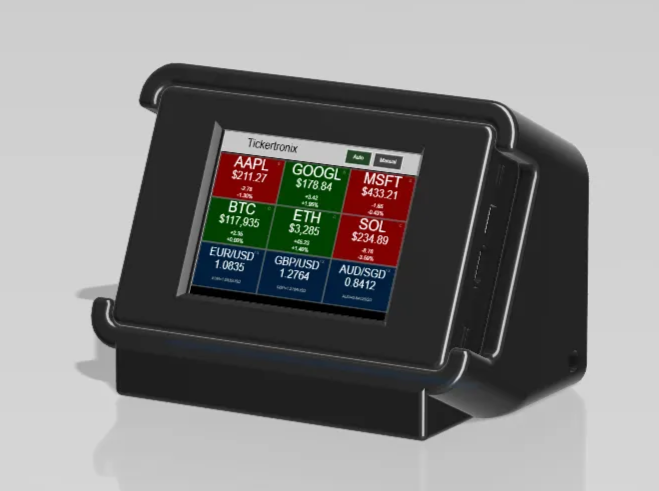
Tired of checking your phone every few minutes? The $20 Ticker brings live stock, crypto, and forex prices to your desk at a glance. Setup takes just minutes with your Tickertronix account, and the ticker displays the assets you’ve already selected in the app. It’s our most budget-friendly, plug-and-play project, designed for both beginners and DIY enthusiasts. Included are 3d
Bill of Materials (BOM)
| Part | Qty | Link |
|---|---|---|
| ESP32-2432S028R | 1 | https://www.amazon.com/DIYmall-ESP32-2432S028R-Dual-core-240X320-Display/dp/B0BVFXR313 |
| 20-dollar-ticker-holder-v1 (3D Print) | 1 | 20-dollar-ticker-holder-v1.stl (Download Link) |
| 20-dollar-ticker-frame-v1 (3D Print) | 1 | 20-dollar-ticker-frame-v1.stl (Download Link) |
| 20-dollar-ticker-back-v1 (3D Print) | 1 | 20-dollar-ticker-back-v1.stl (Download Link) |
3D Print Files
20-dollar-ticker-holder-v1.stl (Download Link)
20-dollar-ticker-frame-v1.stl (Download Link)
20-dollar-ticker-back-v1.stl (Download Link)
Flash Firmware
Insert a Code Block in Notion → paste this (you'll configure in Super later):
<esp-web-install-button manifest="https://downloads.tickertronix.com/esp32-scroller/webflash/manifest.json">
  <button>Flash ESP32</button>
</esp-web-install-button>
Configure Device
Steps for Wi-Fi + API key setup → link to app.tickertronix.com/developer.
Troubleshooting
FAQs, common errors, plus a link to your community forum: